Most distribution plans are still built the night before, in a spreadsheet or an ERP screen, by planners who know the rules by heart. When an order arrives late or a driver calls in sick, the plan gets rebuilt by hand. Upgrading distribution planning often leads to a full system replacement. Logistics optimization software provides a faster alternative: an intelligent optimization layer that integrates directly into your existing infrastructure. This guide details its capabilities, essential optimization parameters, and strategies for seamless deployment alongside active operations.
Key Takeaways
- Logistics optimization software determines the most efficient, feasible plan for your fleet, drivers, and deliveries, automatically updating the schedule whenever conditions change.
- By operating alongside your ERP and TMS, it imports order data and exports optimized plans, eliminating the need for a system replacement.
- Planning speed matters more as cost per mile rises: a plan built on yesterday’s data wastes today’s miles.
- Start with one region, business unit or order type, run it beside your planners, then expand.
What is logistics optimization software?
Logistics optimization software dynamically determines the most effective routing for deliveries by accounting for operational constraints. It handles vehicle assignment, order sequencing, and scheduling, while instantly adjusting to shifts in demand, fleet capacity, or real-time conditions.
Unlike traditional logistics planning methods, an optimization layer operates as an intelligent add-on to your core technology stack rather than requiring a complete infrastructure overhaul.
Instead of locking workflow rules inside rigid spreadsheets or static system modules, an optimization layer continuously analyzes real-time order streams, fleet availability, and customer service level agreements. When unexpected events occur, such as driver call-outs, vehicle breakdowns, traffic delays, or urgent last-minute orders, logistics optimization software continuously re-evaluates capacity and constraints to recalculate the most efficient updated schedule dynamically.
By quickly evaluating potential routing and scheduling scenarios, it automates decision-making, balances driver workloads, minimizes unnecessary mileage, and proactively adjusts to operational disruptions before they impact delivery deadlines.
| Question | Spreadsheet planning | ERP or TMS planning module | Optimization layer |
| How is the route built? | By hand, from planner knowledge | From standard rules in the module | Calculated against configured constraints and objectives |
| Where do the rules live? | In planners’ heads and cell formulas | In module settings, often changed through IT | In configurable rules, set by region, business unit or service type |
| What happens when an order changes? | Someone rebuilds part of the route | Varies by system; often requires executing a complete rerun or making manual adjustments | The route is automatically recalculated to accommodate changes |
| Can you compare options first? | Only by building copies | Limited | What-if scenarios before the route plan is published |
| Is the plan checked before execution? | By the planner’s eye | Against the module’s rules | Validated against constraints, resources and service commitments |
Why does planning speed matter now?
Because every mile costs more, and a slow route plan spends miles it does not need. A plan that takes hours to build is built on data that is already old when trucks leave. The cost side is moving in one direction. According to industry benchmarking data, truck operating costs reached a record high of $2.336 per mile in 2025, reflecting a 3.4% increase over the prior year.
Senior leaders see the same pressure. KPMG surveyed 462 supply chain leaders at companies with $1 billion or more in revenue. According to a KPMG supply chain survey, 38% of supply chain leaders named logistics and transportation costs as their biggest source of value leakage. Faster route planning eliminates systemic inefficiencies and reduces the number of poorly planned, redundant miles your fleet accumulates. By identifying routing inefficiencies early and automating schedule adjustments prior to dispatch, companies can shorten delivery times and reduce redundant mileage while maximizing fleet capacity.
Why does a rip-and-replace slow planning down?
A replacement makes planning improvements wait for the whole migration. Data mapping, testing and retraining come first, and the planners keep using the old method until go-live.
Many companies are on that road. The same KPMG survey found that 30% of leaders are prioritizing an upgrade or replacement of their ERP to get better data integration. An optimization layer separates the two decisions. Your ERP and TMS stay the systems of record. The optimization layer reads orders, locations and resources from them, builds the route plan, and sends it back. If you do replace a core system later, the layer connects to the new one through the same integrations.
What should logistics optimization software optimize?
It should optimize against the constraints your planners already juggle, not a simplified version of them. If the software cannot hold a rule, planners will work around it, and the plan drifts back into the spreadsheet.
| Constraint | Example | What goes wrong if it is missing |
| Time windows | A store accepts deliveries only before 10 a.m. | The plan looks efficient but misses receiving hours |
| Vehicle capacity and type | Weight, volume, refrigeration, access limits | Loads that do not fit, or trucks too large for the street |
| Driver skills and labor rules | Licenses, certifications, hours of service | Plans that break compliance or need manual swaps |
| Service levels | Priority customers, SLA deadlines | Cost-optimal routes that fail the customers who matter most |
| Territories and depots | Which depot serves which accounts | Routes that cross ownership lines and confuse accountability |
| Business objectives | Balance travel time, cost, utilization and workload | A plan that reduces miles but overloads two drivers |
The objective matters as much as the constraints. Shortest distance is rarely the real goal. Most distribution operations balance cost, service and workload, and the weighting should be yours to set.
How does distribution planning work with an optimization layer?
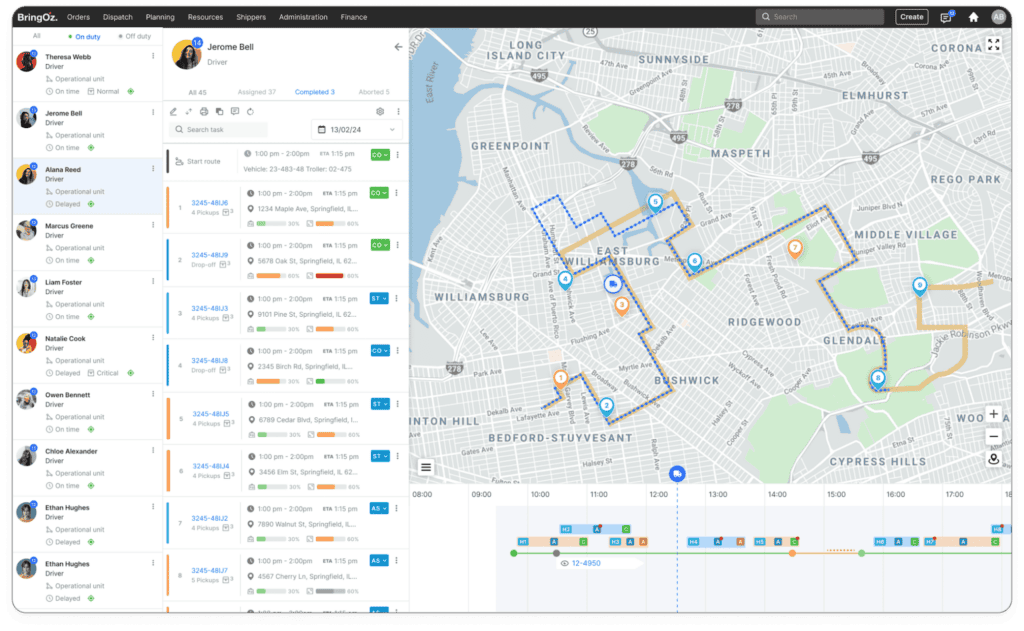
Distribution planning becomes a loop instead of a nightly rebuild. The plan is set ahead, adjusted as the day moves, and corrected using what actually happened.
- Weekly plan. Recurring demand, territories and resources are set for the week.
- Daily schedule. The weekly plan becomes optimized daily routes and sequences, using that day’s orders.
- What-if check. Planners compare alternatives, such as adding a vehicle or moving a delivery day, before publishing.
- Validation. The plan is checked against constraints, resource availability and service commitments before execution.
- Live re-optimization. When urgent orders, delays or cancellations appear, routes are recalculated during the day.
- Plan versus actual. Planned activity is compared with what happened, so tomorrow’s plan starts from real performance.
Step 5 is where planning meets route optimization during execution. Steps 1 to 4 are where an optimization layer changes the planner’s job: from building plans to reviewing them.
How do you roll it out without disrupting operations?
Roll it out in stages, and run it beside your planners before it replaces anything. BringOz is configurable to work alongside existing workflows, so a team can automate selected planning steps first and expand from there.
- Pick one slice. One region, one business unit or one order type.
- Connect the inputs. Orders, customers and resources from your ERP or CRM.
- Encode the rules. Sit with your best planner and capture what they check by instinct.
- Run in parallel. Compare the optimized plan with the manual one for the same days.
- Set different rules where needed. Business units and regions can keep their own constraints and objectives.
- Keep overrides. Dispatchers and planners can still adjust a plan when they know something the system does not.
Build a more efficient logistics network. Book a demo to see how you can optimize routes, reduce operational costs, and deliver more with our intelligent logistics software.
Frequently asked questions
Planning software holds the plan: what should ship, when and from where. Optimization software calculates the best feasible version of that plan within your constraints and recalculates it when conditions change. Many operations use both, with the optimization layer reading from the planning system and sending improved plans back.
No. An optimization layer reads orders and resources from your existing ERP or TMS and sends plans back through integrations. Your core systems stay the record. If you replace one later, the optimization layer connects to the new system instead of being rebuilt.
At minimum, it needs orders, delivery locations, vehicles, drivers and time windows. Better results come from adding the rules planners already apply, such as driver qualifications, labor rules, service levels and territory ownership. Most of this data already sits in your ERP, CRM or HR systems.
Yes. Planners and dispatchers can adjust or override routes when they know something the system does not. The goal is to move them from building plans by hand to reviewing and correcting optimized ones, while keeping the rules and workflow in place.
Because an optimization layer integrates with your existing ERP or TMS rather than replacing it, initial rollout can often happen in weeks. Starting with a single region, business unit, or order type allows operations to validate results quickly without interrupting daily workflows.